Extensions to McMini
TODO: This is still a work in progress. It is hoped that these descriptions are sufficient for anyone to quickly hard-wire these features into their target multi-threaded application. It is planned to more fully integrate these features directly into McMini in the future. (NOTE: McMini is open-source, and we welcome additional developers.)
Shared variables and data races: using LLVM
McMini offers a simple LLVM pass plugin which can be used to instrument any and all accesses to shared memory, enabling McMini to automatically detect data races within the instrumented code.
The first step is to install the required LLVM packages. On most Linux distros, LLVM can be installed by adding the following packages:
llvm llvm-dev clang
On Red Hat-based distros, use llvm-devel.
Next, build a shared library for the LLVM plugin:
make -f Makefile_llvm
Next, instrument the target program, target-source. Note the suffix: _mcmini.
make -f Makefile_llvm path/to/target-source_mcmini
Finally, execute the instrumented target program under McMini:
./mcmini -m <num> path/to/target-source_mcmini
NOTE: The instrumented executable will be compiled with a suffix _mcmini, and it can only be run under McMini, since calls to functions from the McMini shared library have been inserted into the original code.
To run a quick test and verify the plugin, run:
make -f Makefile_llvm check
This instruments the file mcmini/test/data-races/simple-data-race.c and tests it under McMini.
One should see the following output:
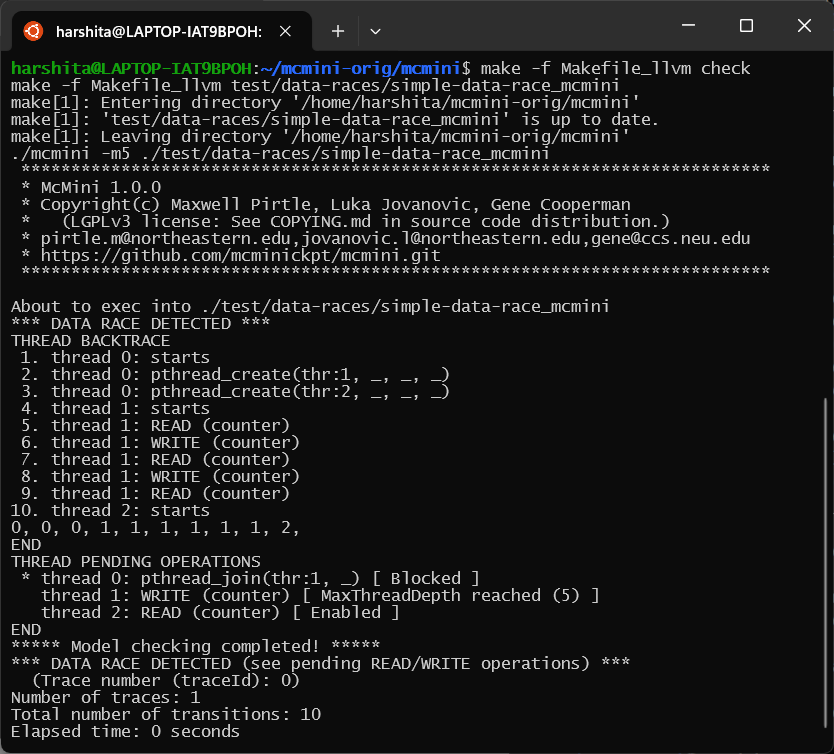
Note that McMini successfully detects a data race. To understand the output, let us have a look at the THREAD PENDING OPERATIONS
THREAD PENDING OPERATIONS
 * thread 0: pthread_join(thr:1, _) [ Blocked ]
   thread 1: WRITE (counter) [ MaxThreadDepth reached (5) ]
   thread 2: READ (counter) [ Enabled ]
The output shows that both threads 1 and 2 are trying to access the shared variable counter, thus indicating a read-after-write data race. McMini can also detect write-after-write data races.
McMini choose(): Modeling inputs
Until now, we have looked only at target programs that did not read from their standard input. A common question is what to do to model check the various possible inputs to a program that does take an input. For example, in a typical producer-consumer program, one might wish to test the program for different patterns of a producer thread and a consumer thread requesting an operation.
One possibility would be to encode the input as arguments on the command line, and then to write a script that calls McMini for each of the interesting patterns of arguments, representing different inputs.
Luckily, there is an easier way to do this. One can use a formal choose() function within the program to be tested. The choose() function has a signature:
int choose(int count);
The return value can range from 0 to count-1 (inclusive). In this case, McMini will view the choose() function as a pseudo-transition, with a different trace for each of the return values from 0 to count-1.
Currently, McMini does not have a built-in choose() function. However, it is easy for the user to include in their program the choose() function supplied in the following code.
In addition, we must include the mutex, the two semaphores, and the extra thread executing choose_helper_thread().
The supplied program, choose.c, is self-contained. One can compile it into a target, choose, and then execute
> ./mcmini -v ./choose
to verify that the function does indeed create a new trace for each of the possible return values of choose(). (In this case, the program has defined CHOOSE_ARG to 3, and so there will be three traces in the McMini output.
Policy on which thread to wake up
TODO: Fill out this section.
(NOTE: McMini is open-source, and we welcome additional writers of documentation. A good starting point for the McMini manual is the McMini paper, cited in the Citations section.)
The current default policy is “arbitrary” (create a new branch to search according to which thread is woken up.
The arbitrary policy requires mmore branches, and hence is slower. A FIFO policy allows McMini to search deeper.